EGM fixes a regular grid of post-decision states and inverts the first-order conditions to recover the states that lead to them. With two states, the recovered points form a curvilinear mesh, on which standard multilinear interpolation does not apply. This notebook builds ENGINE (ENdogenous Grid INterpolation and Extrapolation), the interpolant of Section 4, one step at a time. It checks the two conditions ENGINE needs, carries out its two passes by hand on a small mesh and matches the result against the library, then compares ENGINE with the curvilinear method of White (2015) and with Delaunay triangulation on a larger mesh.
import sys

sys.path.append("../")
sys.path.append("../figures")

import matplotlib.pyplot as plt
import numpy as np
from cli import format_table
from engine.engine2d import Engine2DInterp, warmup_jit
from engine.utilities import (
    bilinear_contains,
    corner_jacobians,
    empirical_ipo_alpha,
    ipm_violations,
    make_warped_egm_grid,
)
from figure_styles import apply_engine_style
from generate_grid_homeomorphism import draw_grid_homeomorphism
from generate_mapping import draw_engine_visual, schematic_f, schematic_mesh_and_query
from HARK.interpolation import Curvilinear2DInterp
from matplotlib.colors import LogNorm
from repo_paths import FIG_DIR, read_rows
from scipy.interpolate import LinearNDInterpolator
from ssj.bench_common import best_time

apply_engine_style()
warmup_jit() # compile ENGINE's kernels once, before anything is timed1The Curvilinear Grid
Index the exogenous grid by along one axis and along the other. The inversion sends node to a point of the endogenous mesh and delivers the function value there as well. The points no longer line up in rows and columns, yet each one keeps the indices of the node that generated it. Call the points sharing one the -slice. Below, the paper’s figure shows the same mesh twice, once in physical coordinates and once in index coordinates; the shaded cell has the same four nodes in both.
fig = draw_grid_homeomorphism()
plt.show()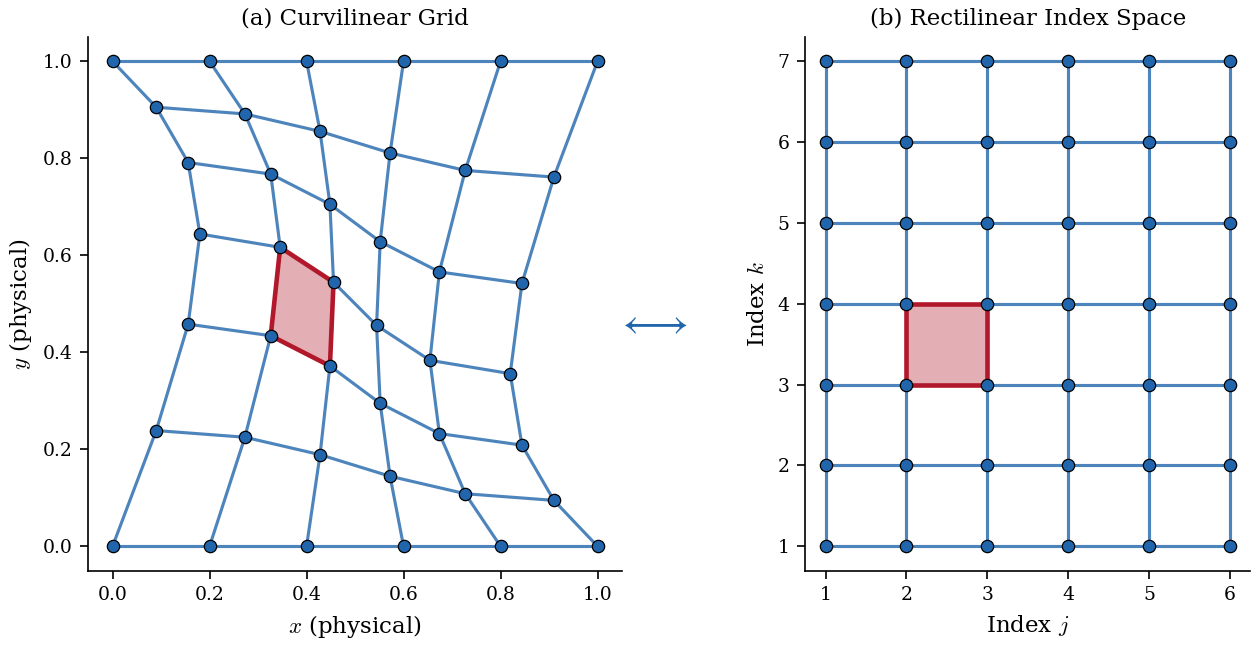
2ENGINE’s Two Conditions
ENGINE requires two properties of the mesh, both about the ordering of its nodes (Section 4):
Fold-free. No cell turns inside out: the Jacobian determinant of each cell’s bilinear coordinate map is positive at all four corners. At the lower-left corner the condition is
Index-preserved monotonicity (IPM). Each coordinate increases along its own index: along every -slice and along every -line.
Together they make the map from index space to the mesh a homeomorphism, so a bracket found on the index grid is a valid bracket on the mesh. The small mesh used for the walkthrough is the one in the paper’s two-pass figure, with values from the smooth function . corner_jacobians returns the four corner determinants of every cell and ipm_violations counts the steps that break IPM:
x_s, y_s, query_paper = schematic_mesh_and_query()
f_s = schematic_f(x_s, y_s)
J_s, K_s = x_s.shape
print(f"mesh: {J_s} x {K_s} nodes")
print(f"smallest corner Jacobian:   {corner_jacobians(x_s, y_s).min():.4f}")
print(f"IPM violations (x-steps, y-steps): {ipm_violations(x_s, y_s)}")
mesh: 7 x 8 nodes
smallest corner Jacobian: 0.0114
IPM violations (x-steps, y-steps): (0, 0)
Every corner determinant is positive and no step breaks IPM, so ENGINE applies. The paper verifies both conditions on every mesh it reports (Section 4) with these same two checks, corner_jacobians and ipm_violations.
3The Two Passes, Step by Step
Take the query , away from the vertical line on which this mesh happens to be unwarped.
Pass 1 works slice by slice. On each -slice the coordinate increases along , so a one-dimensional bracket search finds where the vertical line crosses the slice. Linear interpolation along the slice then gives the crossing’s ordinate and the value there.
Pass 2 works across slices. Because the ordinates increase with , a second bracket search finds the two consecutive slices whose crossings straddle . One more linear interpolation in between their values gives .
The cell below carries out both passes with np.interp alone, visiting every slice, and prints the intermediate quantities.
query = (0.3, 0.55)
x_star, y_star = query

# Pass 1: where x = x* crosses each k-slice, and the value there
y_hat = np.array([np.interp(x_star, x_s[:, k], y_s[:, k]) for k in range(K_s)])
f_hat = np.array([np.interp(x_star, x_s[:, k], f_s[:, k]) for k in range(K_s)])
pass1_rows = [[k + 1, f"{yh:.4f}", f"{fh:.5f}"] for k, (yh, fh) in enumerate(zip(y_hat, f_hat, strict=True))]
print(format_table(["k", "y_hat_k", "f_hat_k"], pass1_rows))

# Pass 2: the two crossings that straddle y*, and linear interpolation between them
k_lo = np.searchsorted(y_hat, y_star) - 1
t = (y_star - y_hat[k_lo]) / (y_hat[k_lo + 1] - y_hat[k_lo])
by_hand = (1 - t) * f_hat[k_lo] + t * f_hat[k_lo + 1]

(library,) = Engine2DInterp(f_s, x_s, y_s)(x_star, y_star)
print(f"\nbracketing slices: k = {k_lo + 1} and {k_lo + 2}, weight t = {t:.4f}")
print(f"two passes by hand: {by_hand:.15f}")
print(f"Engine2DInterp:     {library:.15f}")
print(f"true f(x*, y*):     {schematic_f(x_star, y_star):.15f}")
k y_hat_k f_hat_k
- ------- --------
1 0.0000 -0.43516
2 0.1777 -0.40386
3 0.3581 -0.37628
4 0.5274 -0.35370
5 0.6702 -0.33669
6 0.7867 -0.32402
7 0.8920 -0.31340
8 1.0000 -0.30316
bracketing slices: k = 4 and 5, weight t = 0.1585
two passes by hand: -0.351002565161307
Engine2DInterp: -0.351002565161307
true f(x*, y*): -0.350877192982456
The hand computation and the library agree to the last printed digit. Both differ from the true value in the fourth decimal place, the error of linear interpolation on cells this coarse. The figure redraws the paper’s two-pass illustration at this query, with the values computed above in panel (b).
def f_on_slices(ks, _y_hat):
    """Pass 1 values f_hat_k on the k-slices that cross x = x*."""
    return f_hat[ks]


fig = draw_engine_visual(
    x_s, y_s, query, f_on_slices, (f_hat.min(), f_hat.max()), f_label=r"$\hat{f}_k$"
)
for ax in fig.axes:  # larger text than the paper figure, for reading at page width
    ax.tick_params(labelsize=13)
    ax.xaxis.label.set_fontsize(15)
    ax.yaxis.label.set_fontsize(15)
    ax.title.set_fontsize(15)
    plt.setp(ax.get_legend().get_texts(), fontsize=13)
plt.show()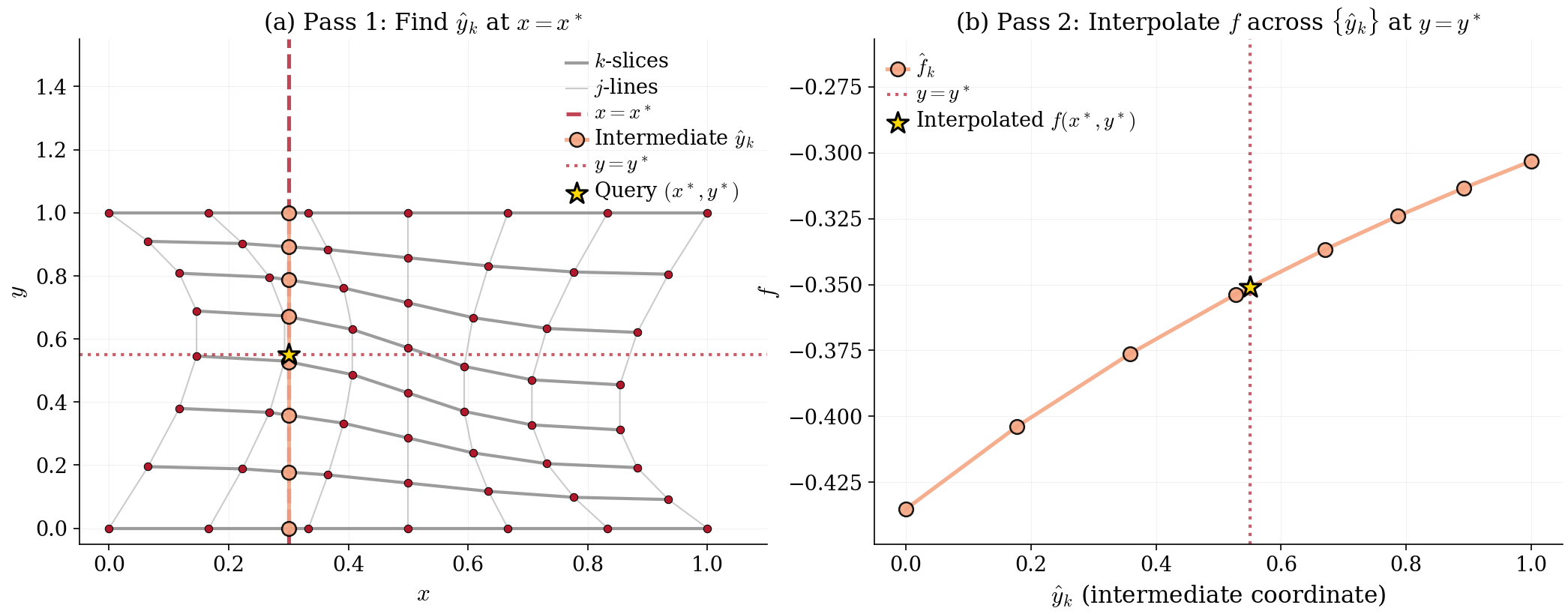
Panel (a) shows Pass 1, with circles at the crossings , unevenly spaced because the mesh is warped at . In panel (b), which shows Pass 2, the line through the circles is linear interpolation of in , and the star is its value at .
The Order of the Passes
Running Pass 1 along the other index family (slices of constant , at ) defines a different interpolant on a warped mesh, because sequential one-dimensional interpolation does not commute across warped coordinate lines. axes_order=(1, 0) selects that order.
def both_orders(point):
    """ENGINE's value at ``point`` with k-slices first and with j-lines first."""
    return tuple(Engine2DInterp(f_s, x_s, y_s, axes_order=order)(*point)[0] for order in ((0, 1), (1, 0)))


k_first, j_first = both_orders(query)
print(f"k-slices first: {k_first:.15f}")
print(f"j-lines first:  {j_first:.15f}")
print(f"difference:     {j_first - k_first:.1e}")
print(f"interpolation error (k-slices first): {k_first - schematic_f(*query):.1e}")
k_paper, j_paper = both_orders(query_paper)
print(f"difference at the paper's query ({query_paper[0]:.1f}, {query_paper[1]:.1f}): {j_paper - k_paper:.1e}")
k-slices first: -0.351002565161307
j-lines first: -0.351015900956107
difference: -1.3e-05
interpolation error (k-slices first): -1.3e-04
difference at the paper's query (0.5, 0.5): 0.0e+00
At this query the two orders differ by about a tenth of the interpolation error. At the paper’s own query, on the unwarped line , they coincide. Section 4 recommends walking the regular axis first, the one with the smaller bracket displacement, and reports that reversing the order in the two-asset model leaves converged accuracy essentially unchanged.
4A Larger Mesh
The comparisons below use the synthetic EGM-style mesh of the repository’s benchmarks and tests, make_warped_egm_grid: geometrically spaced axes from 0.1 to 100 bent by a sinusoidal warp, with values . Spacing is finest near the origin, as on an asset grid. The cell below confirms both conditions, then measures with empirical_ipo_alpha the bracket-displacement constant : the largest number of cells a query’s bracket moves between adjacent slices.
x_m, y_m, f_m = make_warped_egm_grid(40, 40)
print(f"mesh: {x_m.shape[0]} x {x_m.shape[1]} nodes")
print(f"smallest corner Jacobian:   {corner_jacobians(x_m, y_m).min():.2e}")
print(f"IPM violations (x-steps, y-steps): {ipm_violations(x_m, y_m)}")
print(f"bracket displacement alpha_hat: {empirical_ipo_alpha(x_m)}")
mesh: 40 x 40 nodes
smallest corner Jacobian: 4.09e-04
IPM violations (x-steps, y-steps): (0, 0)
bracket displacement alpha_hat: 16
This constant governs only how far a single query’s search must look between slices. ENGINE’s default search window assumes a displacement of at most two cells. When a windowed search misses, ENGINE detects the miss and falls back to a full search of the slice. Hence the window affects speed and never the result.
The Regrid
In each backward step, the solver needs the policy on a regular grid of current states, so it evaluates the interpolant at every node of a rectangular target grid. Engine2DInterp.regrid does this in one call. It walks the targets in sorted order, starting each bracket search where the previous one ended. The target grid here is evenly spaced points on . With bilinear_contains, the cell checks that every target lies inside some mesh cell, where no method needs to extrapolate. It also confirms that the regrid matches separate scattered queries at the same points.
x_new = np.linspace(12.0, 90.0, 60)
y_new = np.linspace(12.0, 90.0, 60)
xq, yq = np.meshgrid(x_new, y_new, indexing="ij")
targets = np.column_stack([xq.ravel(), yq.ravel()])

nodes = np.stack([x_m, y_m], axis=-1)
inside = np.zeros(len(targets), dtype=bool)
for j in range(x_m.shape[0] - 1):
    for k in range(x_m.shape[1] - 1):
        cell = (nodes[j, k], nodes[j + 1, k], nodes[j, k + 1], nodes[j + 1, k + 1])
        inside |= bilinear_contains(cell, targets)
print(f"targets inside the mesh: {inside.sum()} of {inside.size}")

engine = Engine2DInterp(f_m, x_m, y_m)
(f_regrid,) = engine.regrid(x_new, y_new, mode="serial")
(f_scattered,) = engine(xq, yq)
print(f"largest gap, regrid vs scattered queries: {np.abs(f_regrid - f_scattered).max():.1e}")
targets inside the mesh: 3600 of 3600
largest gap, regrid vs scattered queries: 0.0e+00
Accuracy
All three methods now interpolate at the same 3,600 targets. The curvilinear method is HARK’s Curvilinear2DInterp, which locates each target’s cell by a sector walk and solves for its coordinates within the cell. Delaunay triangulation is SciPy’s LinearNDInterpolator, which triangulates the nodes and returns NaN at any query outside their convex hull. Every target lies inside the mesh, so the NaN count printed below checks that claim. Each statistic then covers all 3,600 targets for every method.
points = np.column_stack([x_m.ravel(), y_m.ravel()])
f_true = np.log(xq + yq + 1)
estimates = {
    "ENGINE": f_regrid,
    "Curvilinear": Curvilinear2DInterp(f_m, x_m, y_m)(xq, yq),
    "Delaunay": LinearNDInterpolator(points, f_m.ravel())(xq, yq),
}
errors = {name: np.abs(est - f_true) for name, est in estimates.items()}
error_rows = [
    [name, int(np.isnan(err).sum()), f"{err.mean():.2e}", f"{np.percentile(err, 95):.2e}", f"{err.max():.2e}"]
    for name, err in errors.items()
]
print(format_table(["Method", "NaN", "Mean abs error", "95th pct", "Max abs error"], error_rows))
Method NaN Mean abs error 95th pct Max abs error
----------- --- -------------- -------- -------------
ENGINE 0 1.35e-03 2.45e-03 3.53e-03
Curvilinear 0 1.36e-03 2.57e-03 3.54e-03
Delaunay 0 1.16e-03 2.55e-03 3.48e-03
norm = LogNorm(min(e.min() for e in errors.values()), max(e.max() for e in errors.values()))
fig, axes = plt.subplots(1, 3, figsize=(15, 4.5), sharey=True, layout="constrained")
for ax, (name, err) in zip(axes, errors.items(), strict=True):
    pc = ax.pcolormesh(xq, yq, err, norm=norm, cmap="viridis", shading="auto")
    ax.set_title(name, fontsize=16)
    ax.set_xlabel("$x$", fontsize=15)
    ax.tick_params(labelsize=13)
    ax.grid(False)
axes[0].set_ylabel("$y$", fontsize=15)
cbar = fig.colorbar(pc, ax=axes, pad=0.01)
cbar.set_label("Absolute error", fontsize=15)
cbar.ax.tick_params(labelsize=13)
plt.show()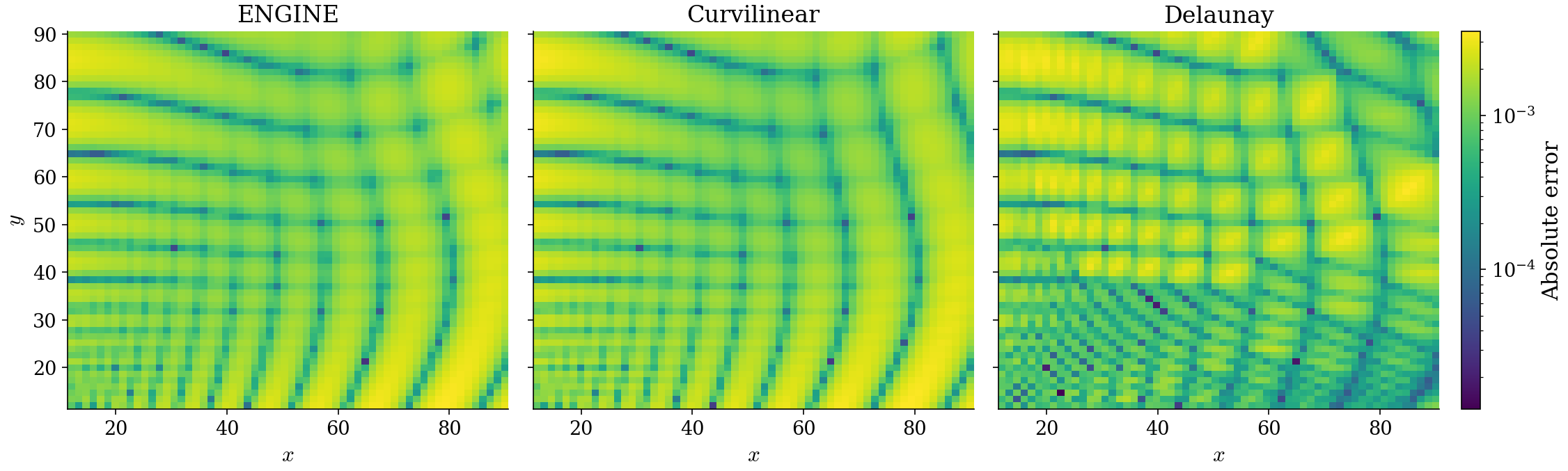
All three are piecewise-linear interpolants of second order in the mesh width. On this mesh their errors agree in size. Section 4 reaches the same verdict for the two structured methods inside a full solve of the two-asset model, where their robust Euler errors agree within two percent.
Cost
The solver rebuilds the interpolant from a new mesh in every backward step, so the relevant cost of one regrid includes each method’s construction step. ENGINE’s constructor does not build cell data. It only validates the input arrays (shapes, finite entries, IPM). The curvilinear method computes per-cell data for its coordinate solve, while triangulation builds its simplices from scratch. Each timing covers construction plus one evaluation at the 3,600 targets, as the best of seven calls after one warm-up call, all three on one thread.
xq_flat, yq_flat = xq.ravel(), yq.ravel()
calls = {
    "ENGINE": lambda: Engine2DInterp(f_m, x_m, y_m).regrid(x_new, y_new, mode="serial"),
    "Curvilinear": lambda: Curvilinear2DInterp(f_m, x_m, y_m)(xq_flat, yq_flat),
    "Delaunay": lambda: LinearNDInterpolator(points, f_m.ravel())(xq_flat, yq_flat),
}
seconds = {name: best_time(call, 7)[0] for name, call in calls.items()}
print(format_table(["Method", "Build + regrid (ms)"], [[name, f"{s * 1e3:.3f}"] for name, s in seconds.items()]))
Method Build + regrid (ms)
----------- -------------------
ENGINE 0.043
Curvilinear 0.357
Delaunay 6.557
Stored with the archive, regrid_percall_abrs.csv holds the paper’s per-call measurement: one realign of the regular target grid at the converged mesh of each of the three interpolation-diagnostic grids, ENGINE against the curvilinear method with its construction step included, best of five calls on one thread on the benchmark machine. It is written by code/ssj/bench_regrid_percall.py.
rows = read_rows(FIG_DIR / "regrid_percall_abrs.csv")
percall_rows = [
    [
        r["label"],
        f"({r['nB']}, {r['nA']})",
        f"{float(r['engine_percall_s']) * 1e3:.3f}",
        f"{float(r['curvilinear_percall_s']) * 1e3:.3f}",
        r["ratio"],
    ]
    for r in rows
]
print(format_table(["Grid", "(nB, nA)", "ENGINE (ms)", "Curvilinear (ms)", "Ratio"], percall_rows))
Grid (nB, nA) ENGINE (ms) Curvilinear (ms) Ratio
------ -------- ----------- ---------------- -----
Coarse (24, 20) 0.020 0.543 27.3
Medium (48, 40) 0.067 1.330 19.7
Fine (96, 80) 0.256 4.687 18.3
The ratio column divides the curvilinear time by ENGINE’s time. Section 4 reports these per-call ratios together with the full-solve gains they produce.